Personalization-In-Sales-Outreach
Master Salesforce Dialer Reporting to Boost Sales Performance
The Regie Team
|
May 18, 2026

Introduction
Sales teams face significant challenges in tracking and assessing calling activities, which are crucial for driving performance. Mastering Salesforce Dialer Reporting helps teams gain insights that improve outreach and streamline decision-making. But how can organizations turn raw data into actionable strategies that lead to measurable sales improvements? This article outlines how to effectively use Salesforce Dialer Reporting for better sales strategies.
Understand Salesforce Dialer Reporting Basics
Sales teams face significant challenges in tracking and assessing calling activities efficiently.
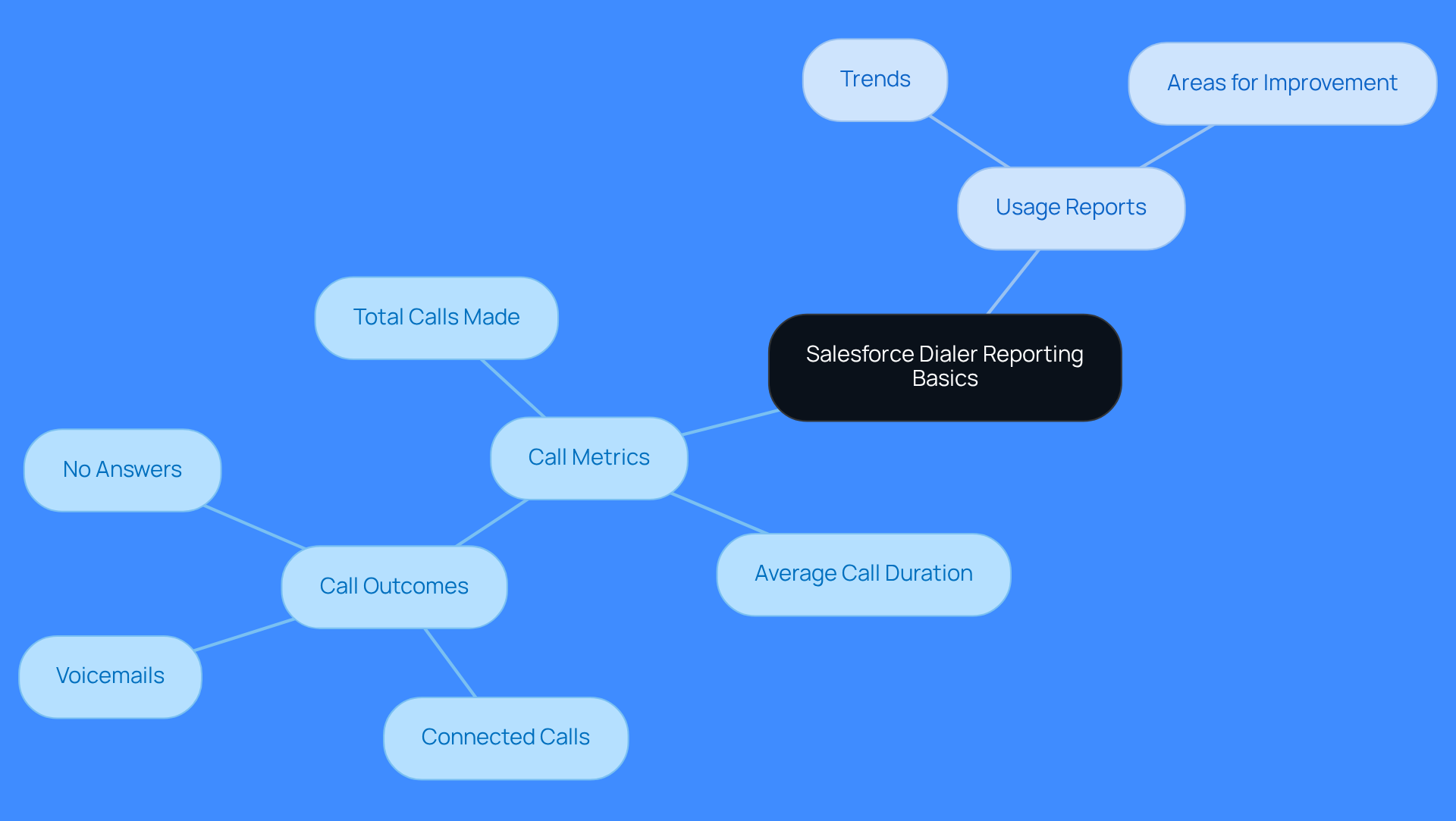
Call Metrics: These metrics are essential for evaluating outreach effectiveness. They include critical data points like total calls made, average call duration, and call outcomes - connected calls, voicemails, and no answers. With Regie.ai, sales teams can dial in the plays they want to execute, ensuring outreach is timely and tailored to the specific persona and intent of leads, maximizing the impact of each call.
Salesforce dialer reporting enables users to create customized report types focused on the VoiceCalls object, allowing for the collection of relevant data specific to their business processes. This customization helps teams assess performance aligned with their unique objectives. Regie.ai enhances this by automating outreach timing and messaging based on engagement, ensuring teams focus on the right leads at the right moment.
Usage Reports: These reports provide insights into how the dialer is utilized across the organization. By identifying trends and areas for improvement, business leaders can make informed decisions to enhance overall productivity. Leveraging Regie.ai's customizable workflows ensures consistent execution of effective outreach strategies, which further enhances salesforce dialer reporting insights.
With Regie.ai, sales teams can transform their reporting into a strategic advantage that drives measurable performance improvements.
Access and Navigate the Salesforce Dialer Reporting Interface
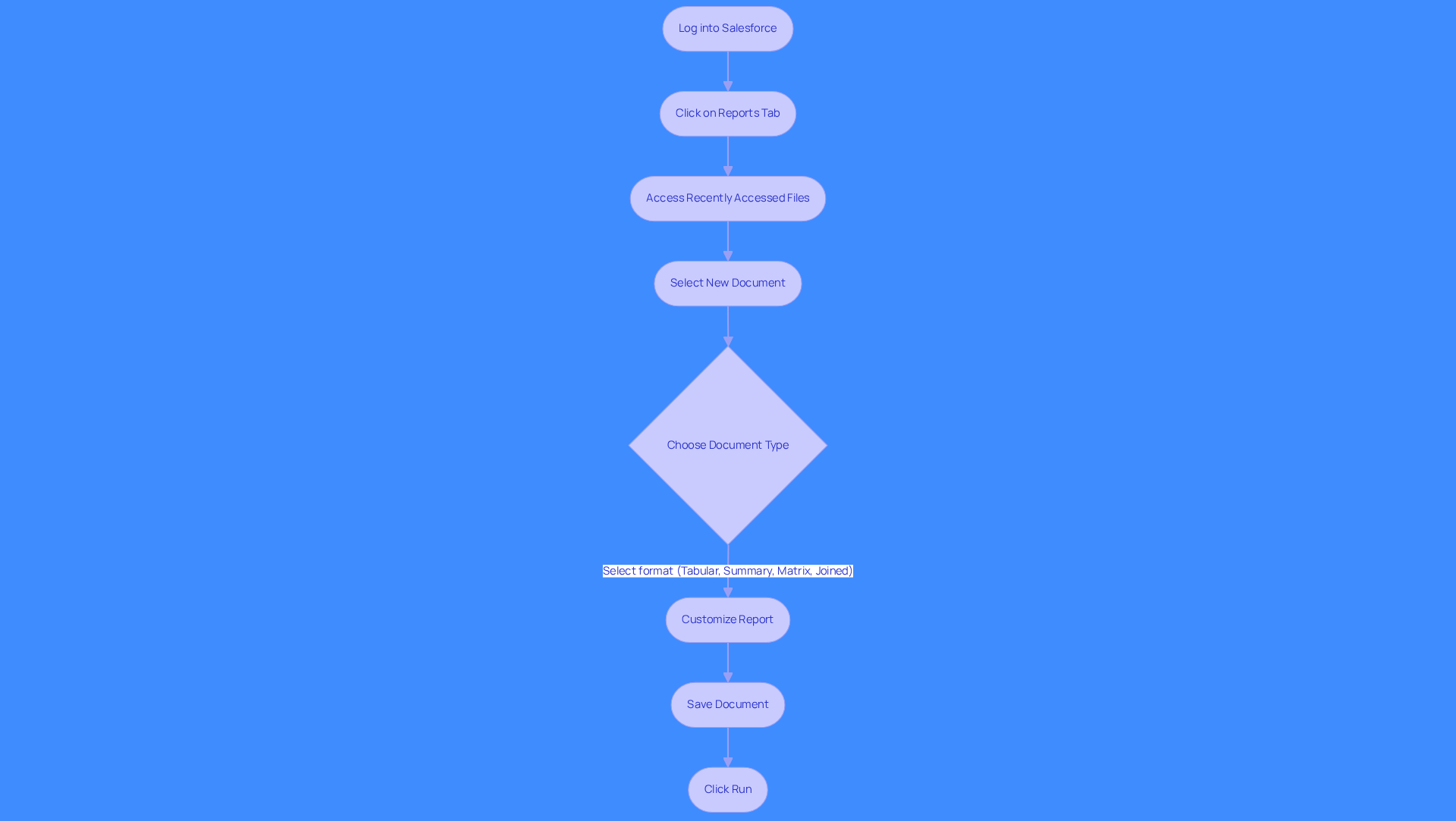
Navigating the salesforce dialer reporting interface can be cumbersome without a clear process. First, log into your Salesforce account to get started. Next, click on the 'Reports' tab in the main navigation menu. Clicking the 'Reports' tab takes you directly to your recently accessed files.
To create a new document, select 'New Document' and choose the custom document type you previously created, focusing on VoiceCalls. Salesforce offers four formats for data presentation:
- Tabular
- Summary
- Matrix
- Joined
Choose the one that best suits your needs. Customize your report by adding relevant fields such as call duration, call outcome, and user details. Adjust filters to narrow down the data to specific time frames or user groups. Be cautious not to overuse filters, as this can limit your findings and lead to misleading data.
Once your document is customized, save it and click 'Run' to view the data. You can also set up updates to be sent to your email at regular intervals. Using relative date filters can help avoid constant manual updates.
Regularly utilizing salesforce dialer reporting can lead to better insights and more strategic decision-making. Additionally, organizing documents into folders by department can streamline your documentation processes.
Analyze Key Metrics for Informed Decision-Making
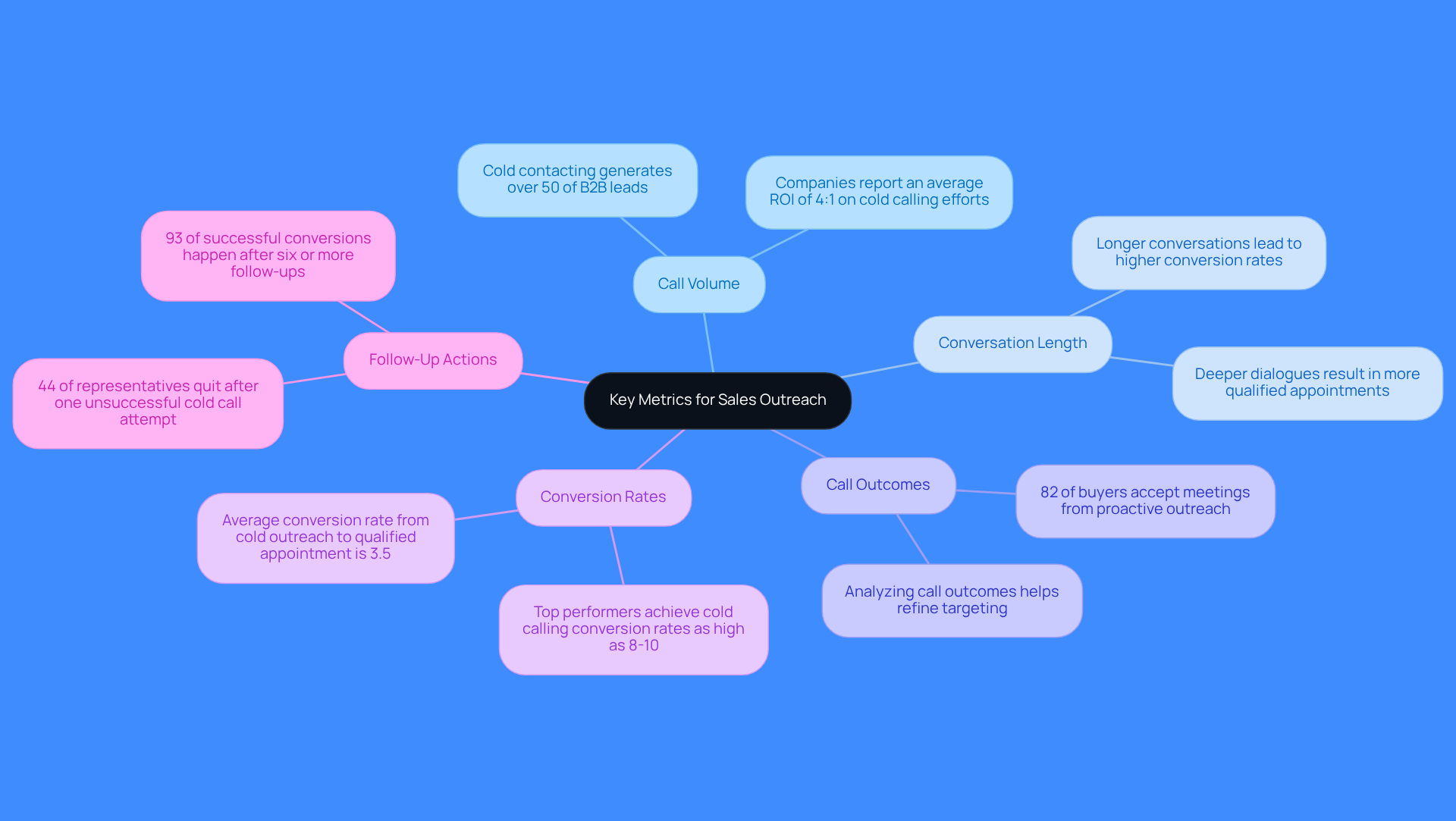
Sales teams often face challenges in optimizing their outreach efforts, leading to missed opportunities. Track your call volume closely; it’s essential for successful outreach. Elevated communication volume often indicates effective initiatives, as cold contacting generates over 50% of B2B leads and is linked to a 40-50% boost in ROI for companies that implement it.
Assessing the average length of conversations offers insights into engagement levels. In 2026, longer sales conversations led to higher conversion rates, as deeper dialogues often result in more qualified appointments.
Analyzing call outcomes - whether they resulted in a connection, went to voicemail, or were unanswered - helps assess the effectiveness of outreach strategies. Understanding these outcomes allows teams to refine their targeting and approach, as 82% of buyers are more likely to accept meetings from proactive outreach.
Conversion rates measure the percentage of inquiries that lead to successful outcomes, such as scheduled meetings or closed deals. In 2026, the average conversion rate from cold outreach to qualified appointment reached 3.5%, emphasizing the significance of effective communication strategies in achieving revenue objectives.
Monitoring follow-up actions taken after conversations, such as sending emails or scheduling additional meetings, ensures that leads are nurtured effectively. Significantly, 44% of representatives quit after one unsuccessful cold call attempt, yet 93% of successful conversions happen after six or more follow-ups, highlighting the necessity for perseverance.
Regularly analyzing these metrics through salesforce dialer reporting can be the difference between stagnation and significant revenue growth.
Implement Insights to Optimize Sales Strategies
Sales teams often struggle with fragmented insights from salesforce dialer reporting, leading to missed opportunities.
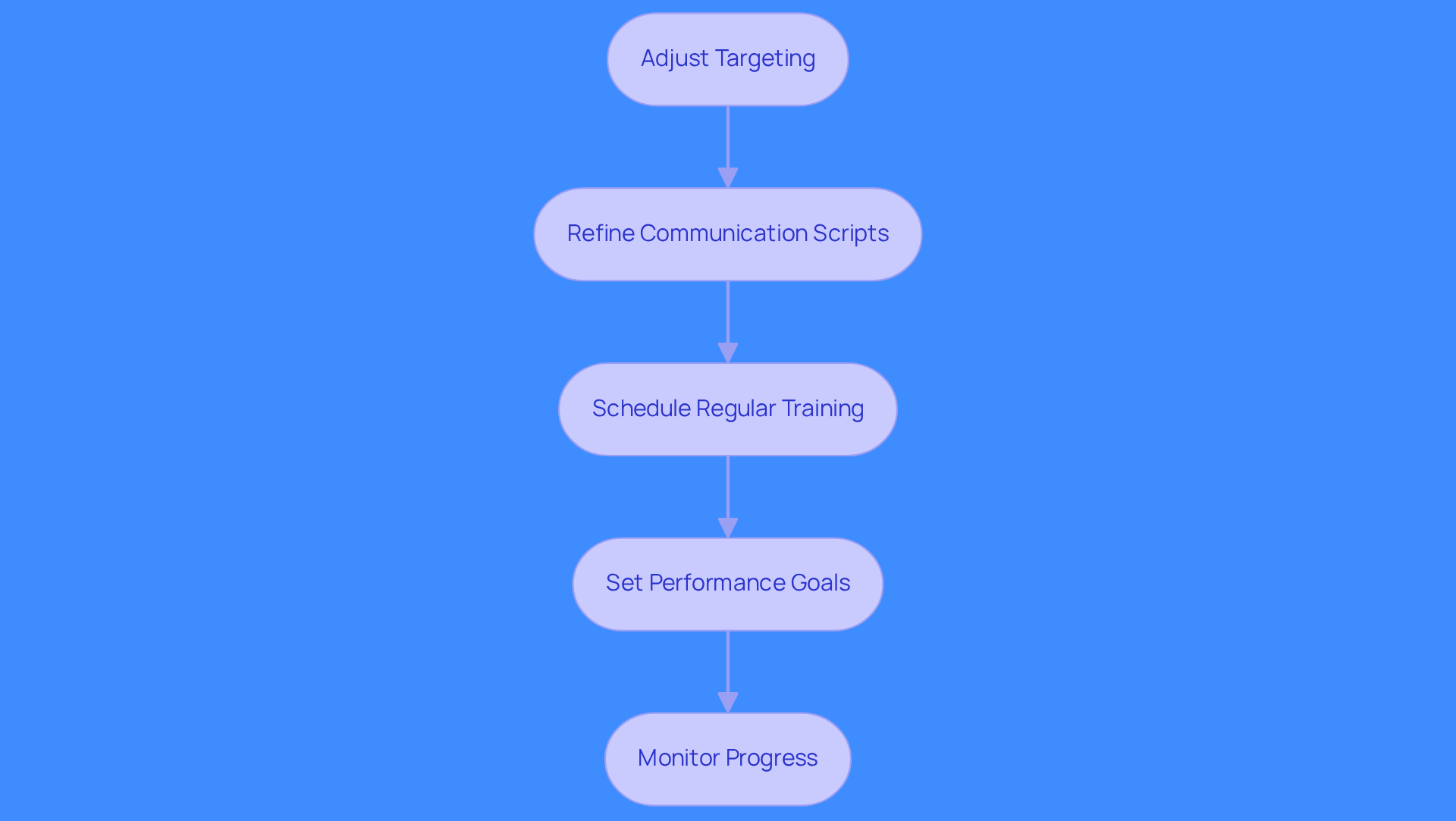
- Adjust Targeting: Target 50-80 communications daily for your outbound SDRs to enhance outreach effectiveness. Focus on prospects who have shown interest in previous discussions or have a higher likelihood of conversion.
- Refine Communication Scripts: Analyze conversation duration and outcomes to pinpoint areas for improvement in your scripts. Be transparent in your calls and personalize your openers to boost engagement.
- Schedule Regular Training: Conduct regular training to sharpen skills and tackle common challenges in sales dynamics. Utilize Regie.ai's professional services for hands-on coaching and access to proven best practices.
- Set Performance Goals: Establish clear performance goals based on analyzed metrics. Aim to increase inquiries or enhance conversion rates over the next quarter. High communication volumes don’t guarantee compliance; ensure your strategies meet TCPA standards.
- Monitor Progress: Continuously review salesforce dialer reporting to evaluate the impact of changes. Adjust strategies based on ongoing performance data. Emphasize follow-up communications after initial calls to maintain engagement and nurture leads effectively. Leverage Regie.ai's automation for contact discovery and tailored messaging to enhance engagement.
Optimizing your sales strategies with Regie.ai can transform your outreach effectiveness and drive measurable results.
Conclusion
Sales teams face significant challenges with fragmented reporting processes that limit their performance and results. By leveraging insights from call metrics and usage reports, teams can tailor their outreach strategies to connect with the right leads at the right time. Streamlining reporting processes turns data into actionable strategies that drive sales outcomes.
Key points emphasize the importance of understanding call metrics, navigating the reporting interface, and analyzing results to inform decision-making. Focusing on metrics like call volume and conversion rates helps sales teams identify trends and refine their outreach strategies. Regular analysis and adaptation are crucial for maintaining agility in their approach.
Optimizing strategies with Salesforce Dialer Reporting drives measurable results, distinguishing successful teams from those that stagnate. Taking proactive steps in utilizing these reporting tools fosters a culture of continuous improvement, leading to sustained revenue growth and stronger customer relationships.
Frequently Asked Questions
What are call metrics in Salesforce Dialer reporting?
Call metrics are essential for evaluating outreach effectiveness and include data points like total calls made, average call duration, and call outcomes such as connected calls, voicemails, and no answers.
How does Regie.ai improve Salesforce Dialer reporting?
Regie.ai enhances Salesforce Dialer reporting by allowing sales teams to tailor their outreach based on specific personas and intents, automating outreach timing and messaging based on engagement, which maximizes the impact of each call.
What is the purpose of customized report types in Salesforce Dialer reporting?
Customized report types focused on the VoiceCalls object enable users to collect relevant data specific to their business processes, helping teams assess performance aligned with their unique objectives.
What insights do usage reports provide in Salesforce Dialer reporting?
Usage reports provide insights into how the dialer is utilized across the organization, helping identify trends and areas for improvement, which allows business leaders to make informed decisions to enhance overall productivity.
How can Regie.ai help with outreach strategies in Salesforce Dialer reporting?
Regie.ai allows sales teams to leverage customizable workflows to ensure consistent execution of effective outreach strategies, which further enhances the insights gained from Salesforce Dialer reporting.
What is the overall benefit of using Regie.ai with Salesforce Dialer reporting?
By using Regie.ai, sales teams can transform their reporting into a strategic advantage that drives measurable performance improvements.
List of Sources
- Understand Salesforce Dialer Reporting Basics
- Sales Dialer Integration Tips (https://trailhead.salesforce.com/content/learn/modules/lightning-dialer-basics/get-started-with-lightning-dialer)
- The Productivity Gap: New Survey Shows 9 in 10 Sellers Are Betting on AI and Agents To Help (https://salesforce.com/news/stories/state-of-sales-report-announcement-2026)
- trellus.ai (https://trellus.ai/post/outbound-call-metrics)
- trailhead.salesforce.com (https://trailhead.salesforce.com/content/learn/modules/lightning-dialer-basics/monitor-sales-calls-and-create-reports)
- salesforce.com (https://salesforce.com/service/contact-center/what-is-a-call-center/metrics)
- Access and Navigate the Salesforce Dialer Reporting Interface
- rizexlabs.com (https://rizexlabs.com/salesforce-reports-and-dashboards-tutorial)
- linkedin.com (https://linkedin.com/learning/salesforce-essential-training-24934421/navigate-the-reports-tab)
- trailhead.salesforce.com (https://trailhead.salesforce.com/content/learn/modules/lightning-dialer-basics/monitor-sales-calls-and-create-reports)
- Analyze Key Metrics for Informed Decision-Making
- The Productivity Gap: New Survey Shows 9 in 10 Sellers Are Betting on AI and Agents To Help (https://salesforce.com/news/stories/state-of-sales-report-announcement-2026)
- Is Cold Calling Still Effective in 2026? The Data Says Yes (https://leadsatscale.com/insights/cold-calling-effectiveness-2026-data)
- comza.org (https://comza.org/blog/why-cold-calling-works-2026)
- thoughtspot.com (https://thoughtspot.com/data-trends/kpi/sales-metrics-kpis)
- Implement Insights to Optimize Sales Strategies
- Modern Cold Calling 2026 | The Method That Converts - Premium B2B Outbound Sales Agency | Predictable Pipeline Growth (https://hook-agency.com/resources/articles/modern-cold-calling-2026)
- gryphon.ai (https://gryphon.ai/regulatory-report-january-2026)
- The Productivity Gap: New Survey Shows 9 in 10 Sellers Are Betting on AI and Agents To Help (https://salesforce.com/news/stories/state-of-sales-report-announcement-2026)
- salesforce.com (https://salesforce.com/in/blog/digital-marketing-hacks-to-increase-sales)