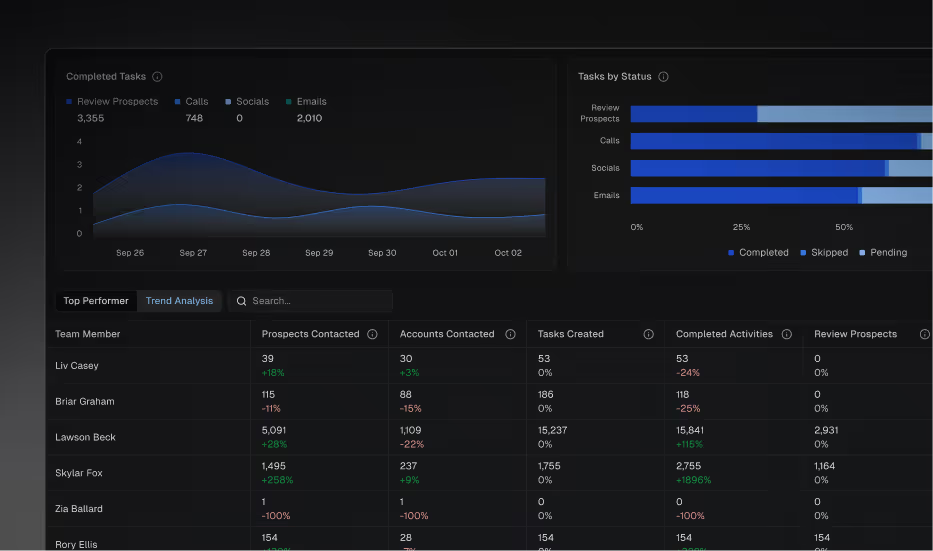
The Leaderboard now compares rep activity in the current period against the prior equivalent, so managers can spot momentum or slowdowns before they turn into a problem. Whether you're looking at a week, month, or custom range, you'll see at a glance who's accelerating and who might need support.
Meeting credit now breaks into three clear categories: Direct (Regie touched a meeting attendee), Indirect (Regie touched someone else at the account), and Not Attributed (no valid first-meeting signal). You'll know exactly where Regie is driving pipeline — and where meetings are happening outside of Regie's influence.
"Not Attributed" meetings are now visible in the Meetings Booked chart and results table, and can be filtered directly from the Attribution page.
Pipeline created is now visualized with a Direct vs. Indirect split, along with trend over time — giving managers a clear view of how Regie-influenced pipeline is building period over period.
Meeting and opportunity data can now be exported from the Attribution page for external analysis or sharing with stakeholders.
Fixed integration users incorrectly appearing under the Organizer field
Fixed meeting organizer names appearing broken in the Attribution tab
Fixed account names not being clickable in Attribution views
Fixed meeting organizers displaying as Unknown
Corrected Meeting Conversion metric calculation on Team Activities dashboard
Updated Calls metric logic for accuracy
Updated Total Activities metric to properly include all relevant activity types
Added tooltips across the Team Activities dashboard and Attribution page to clarify metric definitions
Meetings Booked card on the Admin Homepage now displays total meetings including both Attributed and Not Attributed
Opportunities created and Pipeline created are now combined into a single card on the Admin Homepage
Improved display of meeting attendee information — prospect name and job title now shown
Manual and one-off emails are now reflected in analytics views
Dialer meetings can now be filtered separately via the Meeting Source filter