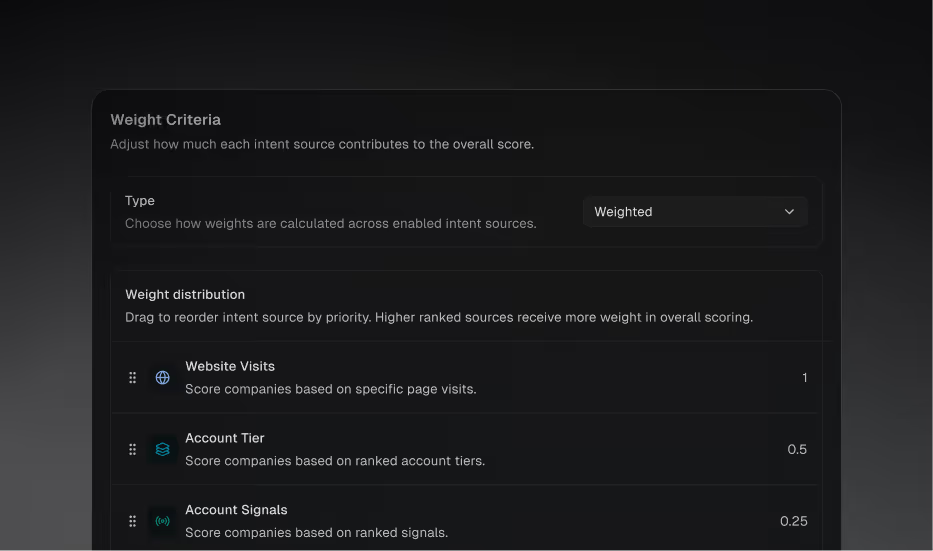
Before Priority Score, every prospect in an agent was treated roughly equally when generating tasks. Now, admins can build a custom scoring model that blends Regie's own signals (like engagement, research data, and intent) with CRM fields (like lead score, MQL date, or account engagement score) to rank prospects. Higher-scored prospects get prioritized for task generation, so your reps spend their time on the prospects your business cares about most.
Who it's for: Admins configuring how prospects are prioritized, and reps who benefit from working higher-value prospects first.
What changed: A new Scoring configuration in workspace settings lets admins select signals, assign weights, and define value ranges. The scoring model is fully configurable — combine Regie signals like Strategic POV, research columns, and engagement data with CRM custom fields like intent scores, account tier, or lead source. Prospects already active in agents are automatically re-scored when the model is updated.
Where to find it: Workspace Settings → Scoring. Prospect and account scores are visible on prospect detail pages and factor into task generation priority across all agents.
Prospect Exclusion Lists now available for Lead-mode agents
OOO Tooltip now displays the end date for a rep's Out of Office period
New Audit logs for Salesforce actions with Manual Dispositions