Personalization-In-Sales-Outreach
4 Best Practices for Salesforce Dialer Implementation Success
The Regie Team
|
Jul 11, 2026

Introduction
Many organizations face challenges with fragmented tech stacks and outdated workflows that hinder their sales efficiency. Focusing on best practices can help teams address these challenges and improve their outreach and revenue growth. Critical strategies exist to ensure seamless integration and effective utilization of the Salesforce dialer. This article outlines essential practices that streamline implementation and empower sales teams to achieve measurable results.
Identify Key Features for Effective Dialer Implementation
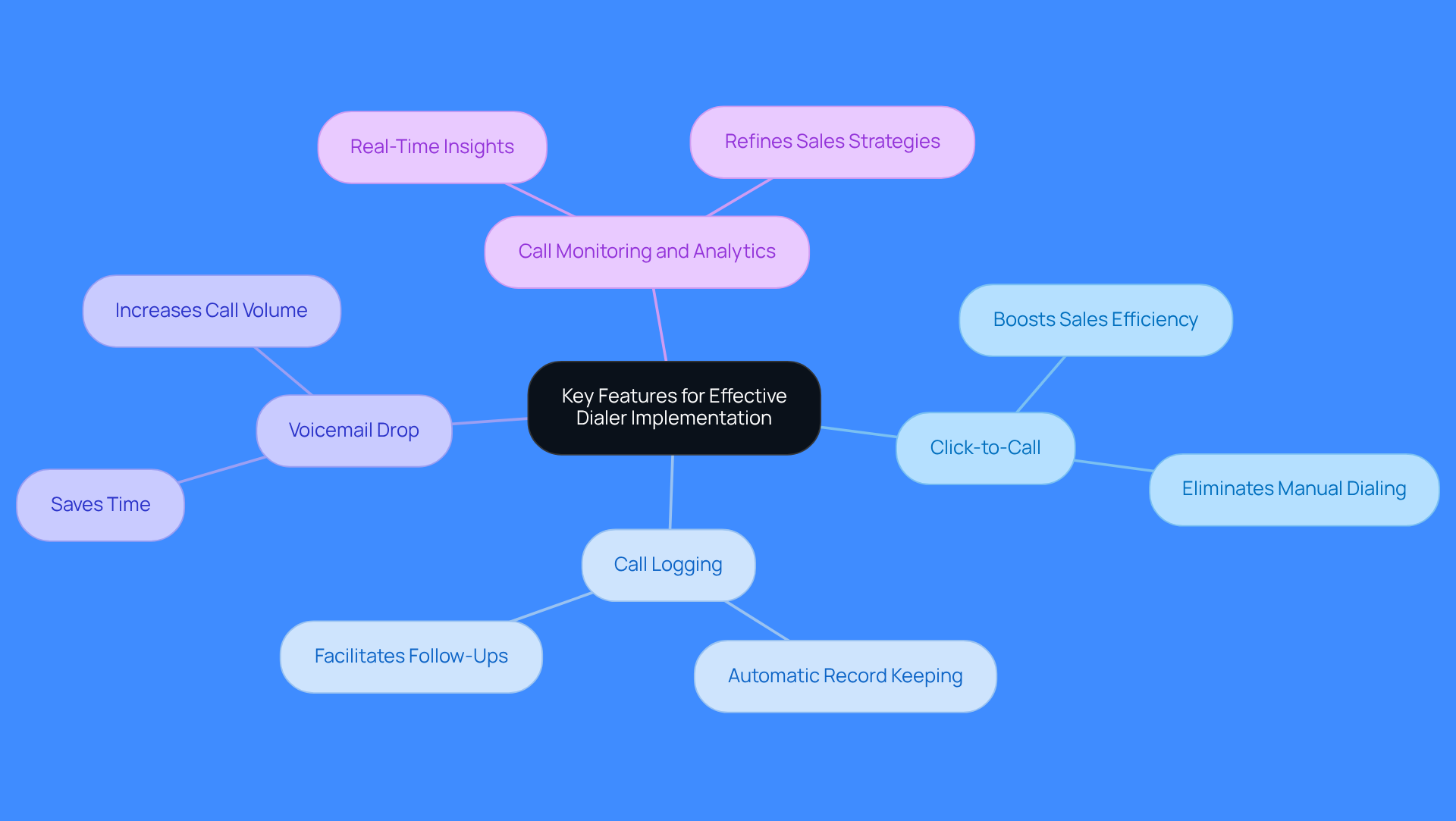
The implementation of a Salesforce dialer reveals operational inefficiencies that can hinder revenue growth. Essential functionalities include:
- Click-to-Call: This feature allows sales representatives to initiate calls directly from the CRM, eliminating wasted time on manual dialing and boosting sales efficiency.
- Call Logging: Automatic logging of call details records all interactions automatically, maintaining accurate records for follow-up and analysis without additional effort.
- Voicemail Drop: This functionality enables representatives to leave pre-recorded voicemails, saving time and increasing the volume of calls made, which directly impacts outreach volume.
- Call Monitoring and Analytics: Real-time monitoring and detailed analytics provide valuable insights into call performance, helping teams refine their strategies and improve outcomes.
Concentrating on these attributes can improve calling efficiency and ensure callers support business objectives. Teams that leverage these functionalities often see measurable improvements in connection rates and revenue outcomes with Salesforce dialer implementation.
Ensure Seamless Integration with Salesforce and Other Tools
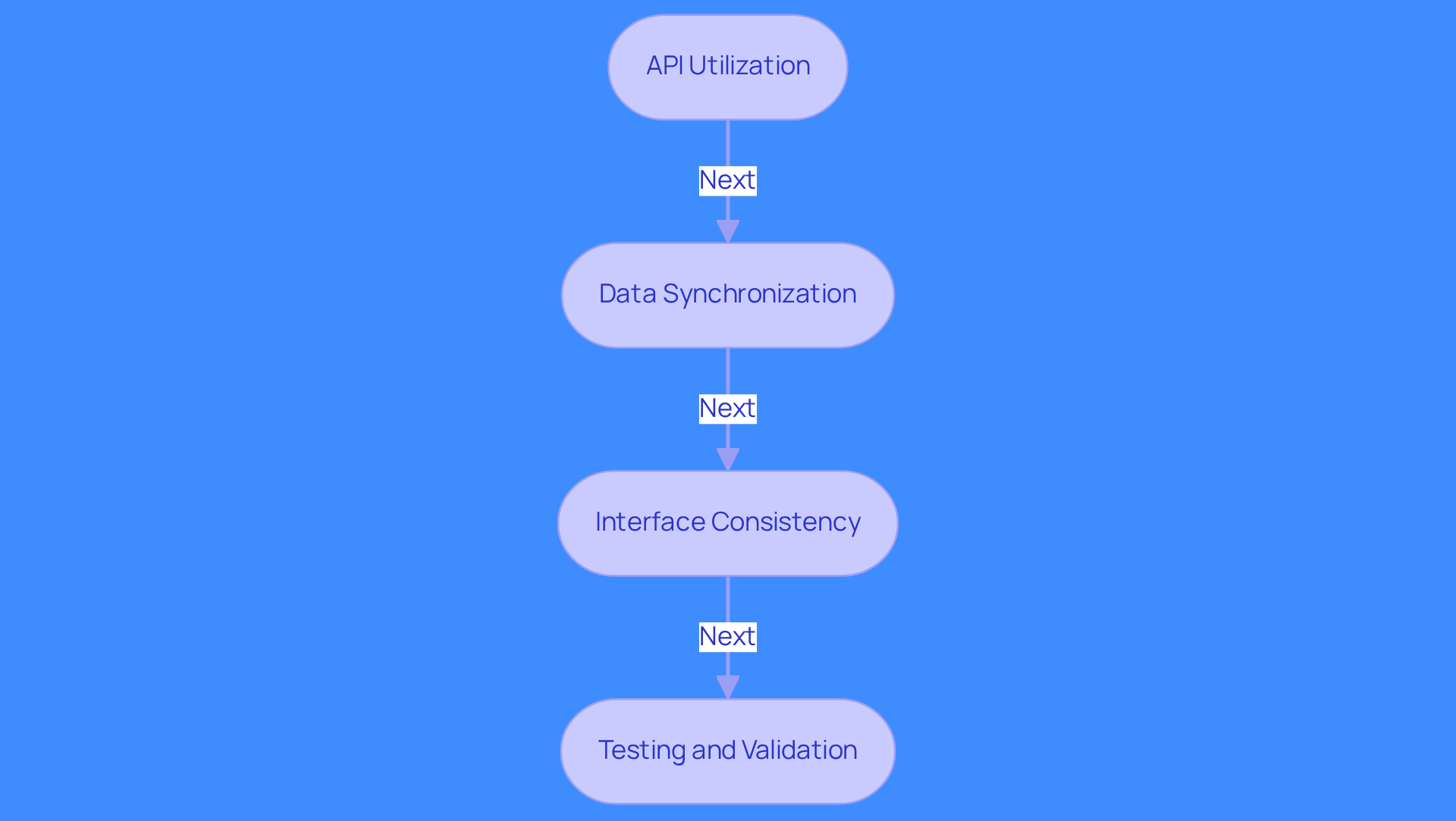
Integration challenges can lead to costly disruptions in sales processes, making the salesforce dialer implementation essential for a robust calling system. Here are some best practices:
- API Utilization: Leverage APIs to connect the dialer with Salesforce, facilitating smooth data flow between systems without manual intervention. This approach enhances efficiency and reduces the risk of errors.
- Data Synchronization: Regularly synchronize data between the calling system and Salesforce to maintain up-to-date contact information and call logs. Effective synchronization can lead to improved forecasting accuracy and better decision-making.
- Interface Consistency: Ensure that the dialer interface aligns with Salesforce's design to minimize the learning curve for individuals. A familiar interface can significantly enhance adoption and productivity.
- Testing and Validation: Conduct thorough testing of the integration before full deployment to identify and resolve any issues that may arise. This step is essential to prevent disruptions in revenue workflows and ensure a smooth transition.
Following these practices can streamline operations and improve revenue outcomes. Regie.ai's professional services team will establish agents, the calling system, and RegieOne according to your specific use case and business objectives, ensuring that your team is prepared for success from day one. Their hands-on coaching and library of proven best practices, built from insights across top-performing reps, can help drive maximum impact. For example, Regie.ai's integration with Salesforce, especially with the salesforce dialer implementation, has shown substantial enhancements in revenue processes, illustrating the advantages of a well-executed integration. As Klarissa Fitzpatrick, a Content Manager and AI Phoning expert, observes, "A Salesforce calling system is essential for automating outreach and enhancing data accuracy." Following these guidelines can significantly enhance sales performance and drive measurable revenue growth.
Provide Comprehensive Training and Ongoing Support for Users
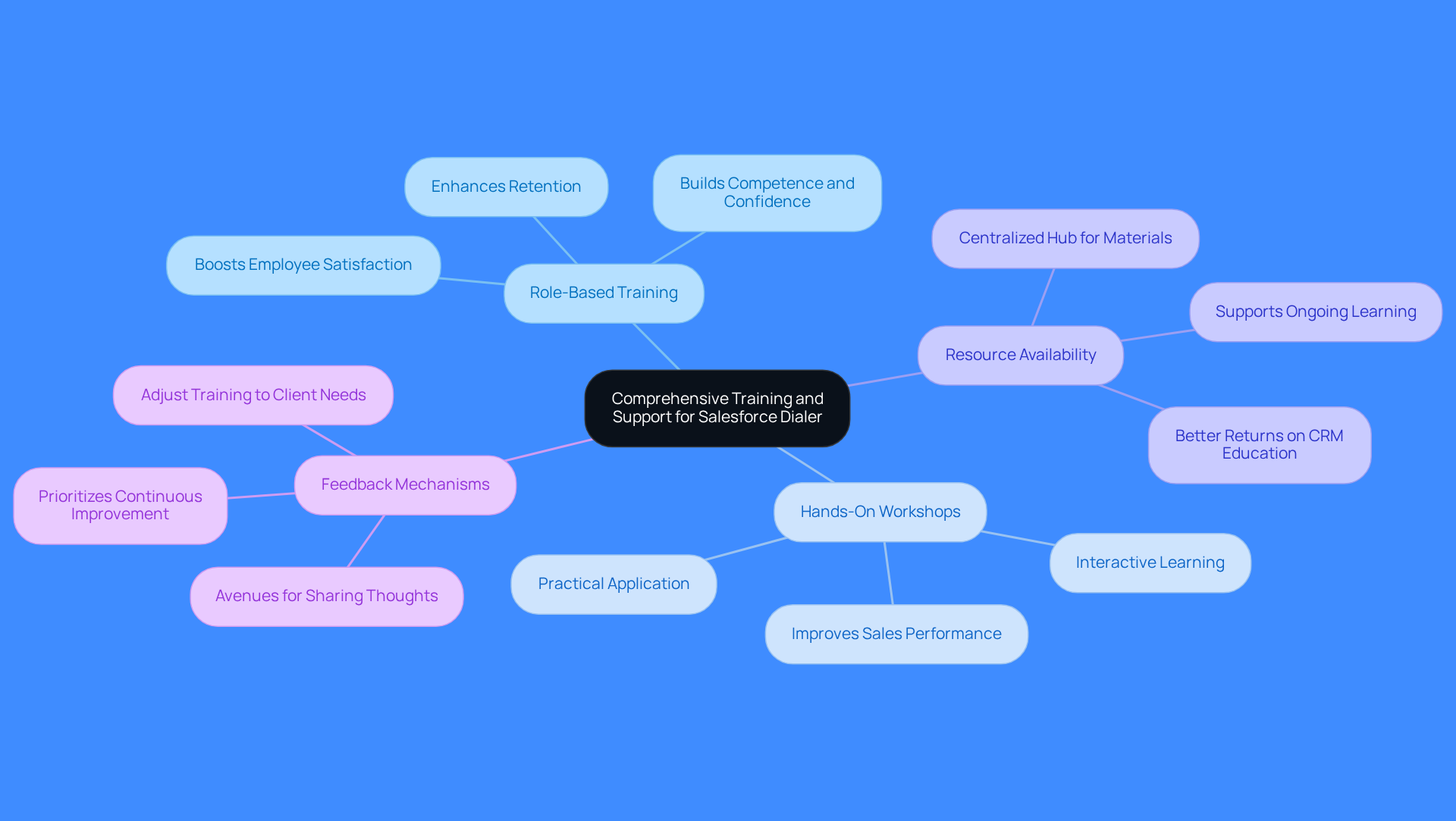
Maximizing the effectiveness of the Salesforce dialer implementation requires a commitment to effective training and ongoing support. Consider these strategies:
- Role-Based Training: Tailor training sessions for different user roles, like Sales Development Representatives (SDRs) and Account Executives (AEs). This approach boosts employee satisfaction and retention by building competence and confidence.
- Hands-On Workshops: Conduct interactive workshops where users practice using the Salesforce dialer implementation in real scenarios. Hands-on workshops build confidence and improve sales performance through practical application.
- Resource Availability: A centralized hub for educational materials provides quick access to resources, supporting ongoing learning. Companies that invest in role-based development see better returns on their CRM education.
- Feedback Mechanisms: Create avenues for individuals to share their thoughts on the dialer and educational programs. Organizations that prioritize feedback can adjust their training to meet client needs.
By emphasizing training and assistance, organizations can improve user acceptance and ensure that the Salesforce dialer implementation is utilized to its full capacity. This commitment not only enhances user engagement but also drives significant revenue growth.
Monitor Performance and Optimize Dialer Usage Regularly
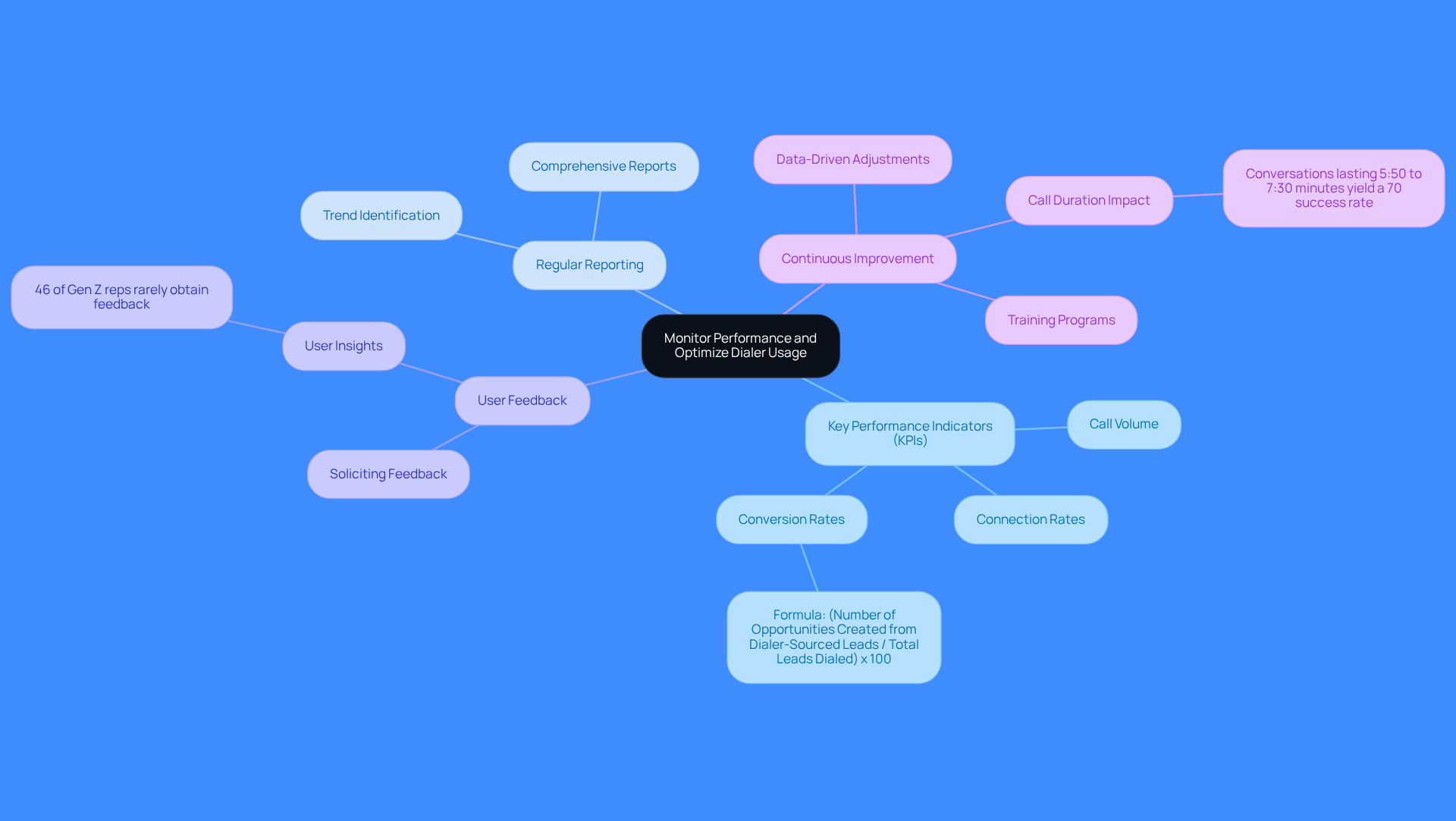
Neglecting Salesforce performance monitoring can lead to misaligned sales objectives and lost revenue opportunities. Here are some best practices to consider:
- Key Performance Indicators (KPIs): Track essential KPIs like call volume, connection rates, and conversion rates. Calculate the conversion rate using the formula:
(Number of Opportunities Created from Dialer-Sourced Leads / Total Leads Dialed) x 100. These metrics reveal caller effectiveness and highlight areas for improvement. For instance, a high connect rate with a low conversation rate may indicate issues with messaging or targeting. - Regular Reporting: Generate comprehensive reports on usage and performance metrics of the calling system. This practice allows teams to identify trends over time, facilitating data-driven decisions that enhance dialing strategies.
- User Feedback: Solicit user feedback on their dialer experiences. Insights from sales agents can highlight potential improvements and ensure the tool meets their needs effectively. Notably, 46% of Gen Z representatives indicate rarely obtaining feedback on their discussions, underscoring the importance of this practice.
- Continuous Improvement: Utilize the data collected to inform adjustments in dialing strategies, training programs, and feature utilization. Frequent evaluations of revenue performance can lead to enhanced outcomes and increased conversion rates. Additionally, conversations lasting 5:50 to 7:30 minutes yield a 70% success rate, illustrating the impact of call duration on performance.
Implementing these practices ensures that the salesforce dialer implementation drives sales success and boosts productivity.
Conclusion
Many organizations struggle with inefficient calling processes that hinder sales performance. Focusing on key features, seamless integration, and comprehensive training ensures dialer implementation meets expectations. Key functionalities like click-to-call and call logging streamline calling and boost outreach volume. Best practices for integrating with Salesforce ensure data synchronization and user-friendly interfaces. Tailored training and ongoing support empower sales teams to maximize dialer use, while performance monitoring keeps strategies aligned with objectives. A well-implemented dialer can streamline operations, boost productivity, and directly impact revenue outcomes. These best practices enhance user engagement and help organizations capitalize on every sales opportunity. Prioritizing these strategies helps businesses implement a robust dialer system that drives success.
Frequently Asked Questions
What are the key features of an effective Salesforce dialer implementation?
Key features include Click-to-Call, Call Logging, Voicemail Drop, and Call Monitoring and Analytics.
How does the Click-to-Call feature benefit sales representatives?
The Click-to-Call feature allows sales representatives to initiate calls directly from the CRM, eliminating wasted time on manual dialing and boosting sales efficiency.
What is the purpose of Call Logging in a Salesforce dialer?
Call Logging automatically records all interactions, maintaining accurate records for follow-up and analysis without requiring additional effort from the sales team.
How does the Voicemail Drop functionality enhance outreach efforts?
Voicemail Drop enables representatives to leave pre-recorded voicemails, saving time and increasing the volume of calls made, which positively impacts outreach volume.
What advantages does Call Monitoring and Analytics provide?
Call Monitoring and Analytics offer real-time monitoring and detailed insights into call performance, helping teams refine their strategies and improve outcomes.
What impact can leveraging these dialer functionalities have on sales teams?
Teams that utilize these functionalities often experience measurable improvements in connection rates and revenue outcomes with Salesforce dialer implementation.
List of Sources
- Identify Key Features for Effective Dialer Implementation
- 4 Best Practices to Optimize Your Salesforce Dialer Tool (https://regie.ai/blog/4-best-practices-to-optimize-your-salesforce-dialer-tool)
- Salesforce Dialers: The 5 Best for Boosting Connection Rates (https://medium.com/@samirmajumdar/salesforce-dialers-the-5-best-for-boosting-connection-rates-6cf24cad9ceb)
- Best Salesforce Dialers for High-Performance Outbound Teams (2026) | Convoso (https://convoso.com/blog/best-salesforce-dialers)
- 10 Best Salesforce Power Dialers in 2026 (Compared & Reviewed) | Ringover (https://ringover.com/blog/salesforce-power-dialer)
- 7 Best Salesforce Dialers in 2026 (Tested & Compared) (https://aloware.com/blog/best-dialers-for-salesforce)
- Ensure Seamless Integration with Salesforce and Other Tools
- 8 Best Salesforce Auto Dialers for Cold Calling Teams (https://trellus.ai/post/salesforce-auto-dialer)
- The 14 Best Salesforce Integrations for Sales Teams in 2026 - CloudTalk (https://cloudtalk.io/blog/best-salesforce-integrations)
- Mastering Salesforce Sales Dialer: A Comprehensive 2026 User Guide (https://frejun.com/salesforce-sales-dialer-user-guide)
- Top 3 Dialers for Salesforce Integrations Compared (Pros, Cons & Pricing) | Ringover (https://ringover.com/blog/dialer-for-salesforce)
- Best Salesforce Auto Dialer in 2026 (https://smartlead.ai/blog/salesforce-auto-dialer)
- Provide Comprehensive Training and Ongoing Support for Users
- Is Salesforce training worth it in 2026? (Calculating the real ROI for learners and employers) - K2 University (https://k2university.com/news/is-salesforce-training-worth-it-in-2026-calculating-the-real-roi-for-learners-and-employers)
- Role Based Training: Benefits, Examples and Best Practices (https://sundaysky.com/blog/role-based-training)
- Role-Based Sales Training Creates Winning Teams | Richardson Sales Performance (https://richardson.com/sales-training-delivery/role-based)
- Creating Effective Product Training for Sales Teams (https://articulate.com/blog/product-training-for-sales-teams)
- 💡 eLearning Tips & Resources for Corporate Training | isEazy (https://iseazy.com/blog/sales-training-for-companies)
- Monitor Performance and Optimize Dialer Usage Regularly
- The Productivity Gap: New Survey Shows 9 in 10 Sellers Are Betting on AI and Agents To Help (https://salesforce.com/news/stories/state-of-sales-report-announcement-2026)
- 9 Sales KPIs Every Sales Team Should Be Tracking (https://salesforce.com/sales/performance-management/sales-kpis)
- Top Sales KPIs to Track (https://netsuite.com/portal/resource/articles/accounting/sales-kpis.shtml)
- Top Sales Dialing Metrics That Matter and How to Track Them (https://koncert.com/blog/top-sales-dialing-metrics)
- 10 Essential Salesforce Dialer Metrics to Boost Sales Performance (https://regie.ai/blog/10-essential-salesforce-dialer-metrics-to-boost-sales-performance)