Maximize Sales Efficiency with Outbound Dashboards: Best Practices

Introduction
Sales teams face a critical challenge in maximizing the potential of their outbound dashboards. These tools are essential for providing real-time insights that empower teams to make informed decisions and prioritize high-impact activities. The challenge is effectively leveraging these dashboards to drive revenue growth. Identifying best practices is essential for maximizing dashboard effectiveness and driving revenue growth.
Understand the Outbound Dashboard: Definition and Importance
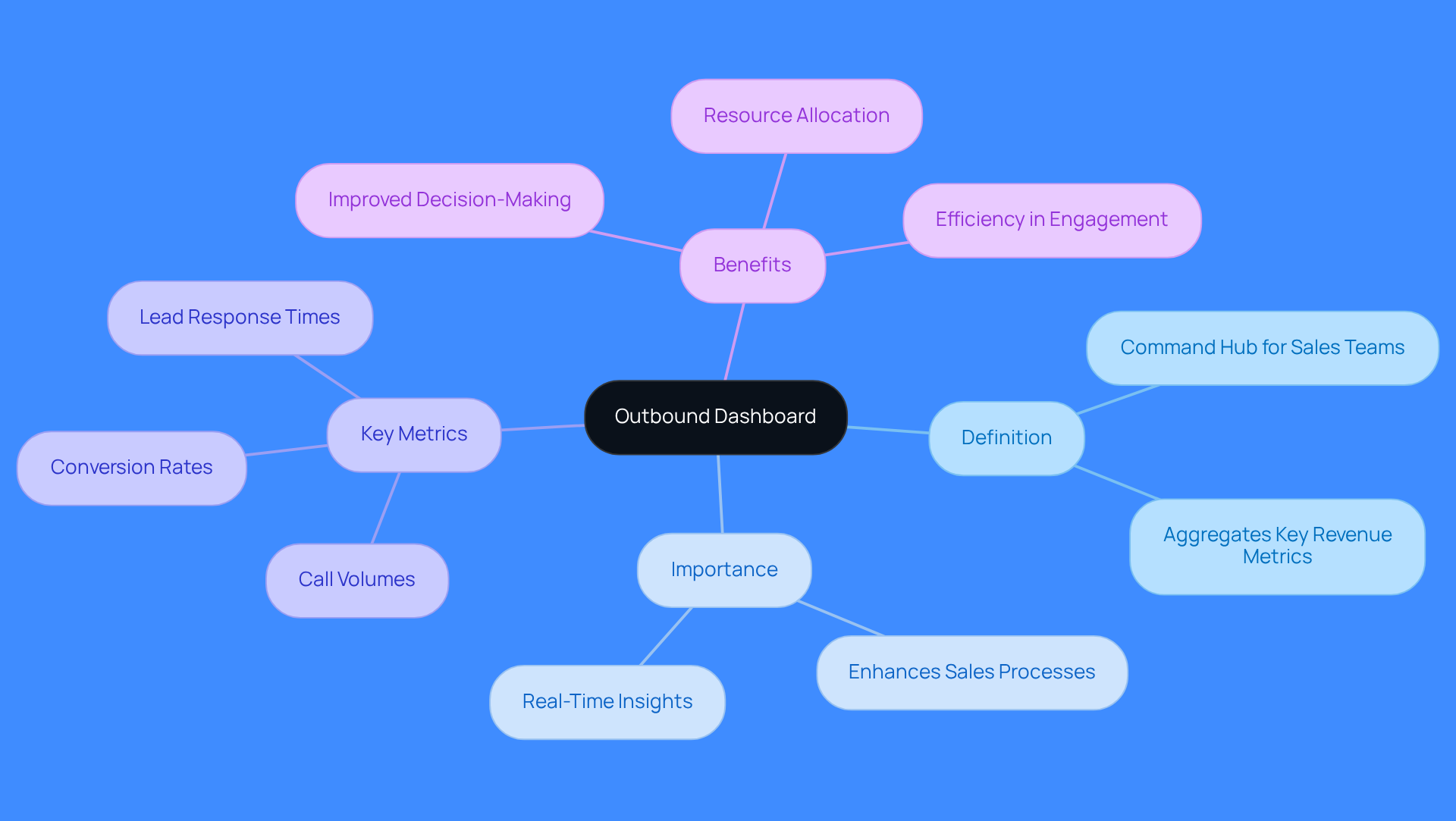
An outbound dashboard serves as a command hub for sales teams, aggregating key revenue metrics and activity indicators crucial for outbound sales success. Outbound dashboards enhance sales processes by providing real-time insights into performance metrics such as call volumes, conversion rates, and lead response times. By visualizing essential metrics, sales representatives can prioritize high-impact activities, ultimately improving their efficiency and effectiveness in engaging potential clients.
Organizations using outbound displays report significant improvements in decision-making and resource allocation. These tools transform raw data into organized information that guides strategic actions, allowing teams to replicate effective behaviors identified through detailed monitoring of sales activities. Moreover, real-time insights enable teams to swiftly recognize strengths and weaknesses, encouraging prompt modifications to their strategies.
Ultimately, the outbound dashboard empowers sales teams to concentrate on high-impact actions that drive revenue growth.
Leverage Key Features of Outbound Dashboards for Enhanced Efficiency
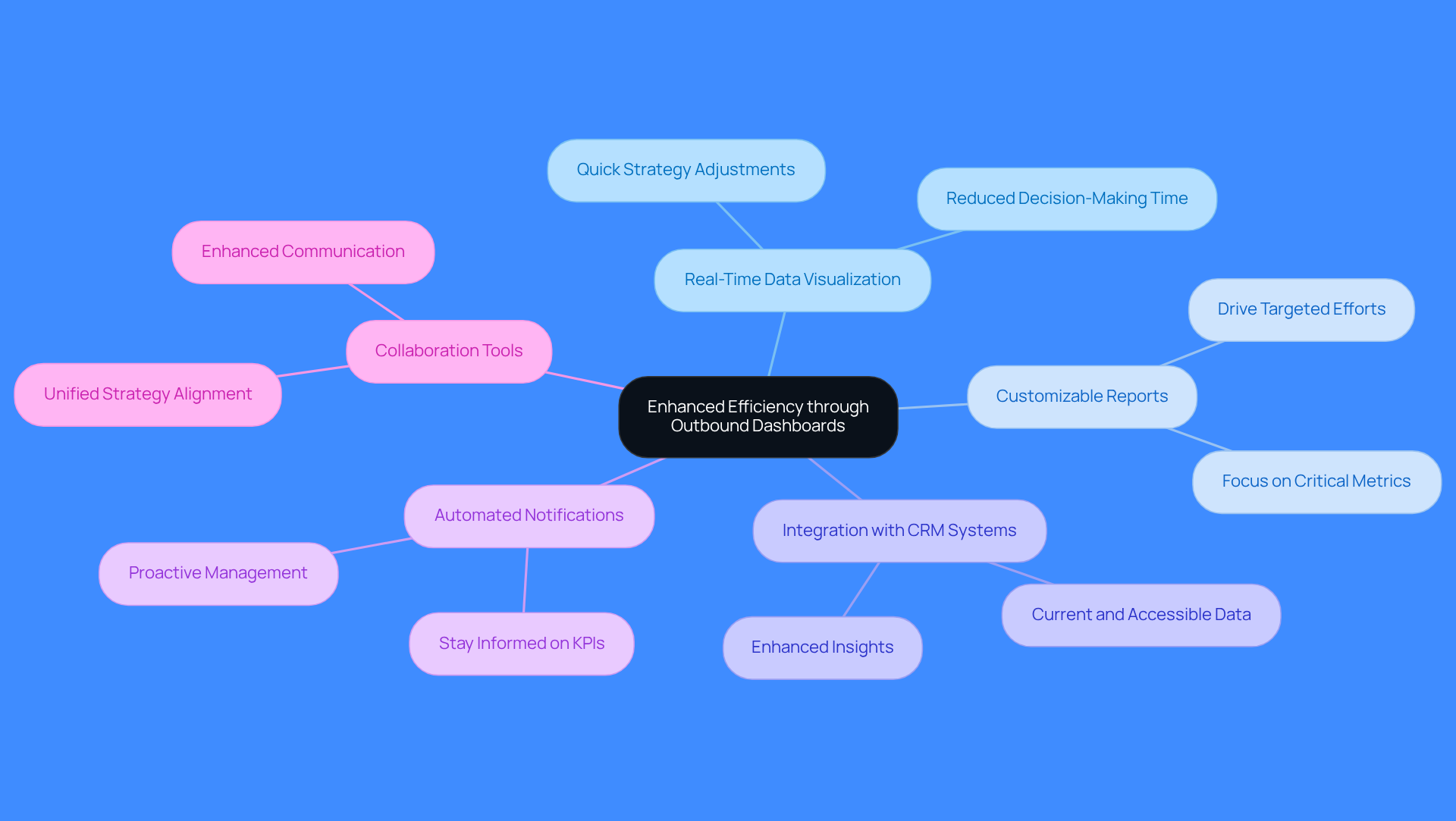
Sales teams face significant delays in decision-making due to outdated workflows and fragmented tech stacks. To enhance the efficiency of outbound sales, teams should leverage key features:
- Real-Time Data Visualization: This feature lets teams track performance metrics in real-time, enabling quick strategy adjustments. Teams utilizing an outbound dashboard cut decision-making time from days to minutes, making them more responsive to market changes.
- Customizable Reports: Tailoring reports to specific revenue goals ensures teams focus on the most critical metrics, driving targeted efforts and improved results.
- Integration with CRM Systems: Seamless integration with CRM platforms ensures all data is current and accessible, crucial for informed decision-making. Many companies find that combining CRM data with other tools, like call platforms, yields better insights than relying solely on CRM metrics.
- Automated Notifications: Setting up alerts for key performance indicators (KPIs) keeps teams informed about significant changes in their revenue activities, enabling proactive management.
- Collaboration Tools: Features that promote team collaboration enhance communication and strategy alignment among sales agents, fostering a unified approach to achieving revenue goals.
Embracing these features not only streamlines operations but also positions teams for measurable revenue growth.
Implement Best Practices for Maximizing Outbound Dashboard Effectiveness
To drive outbound sales success, teams must leverage effective dashboard practices:
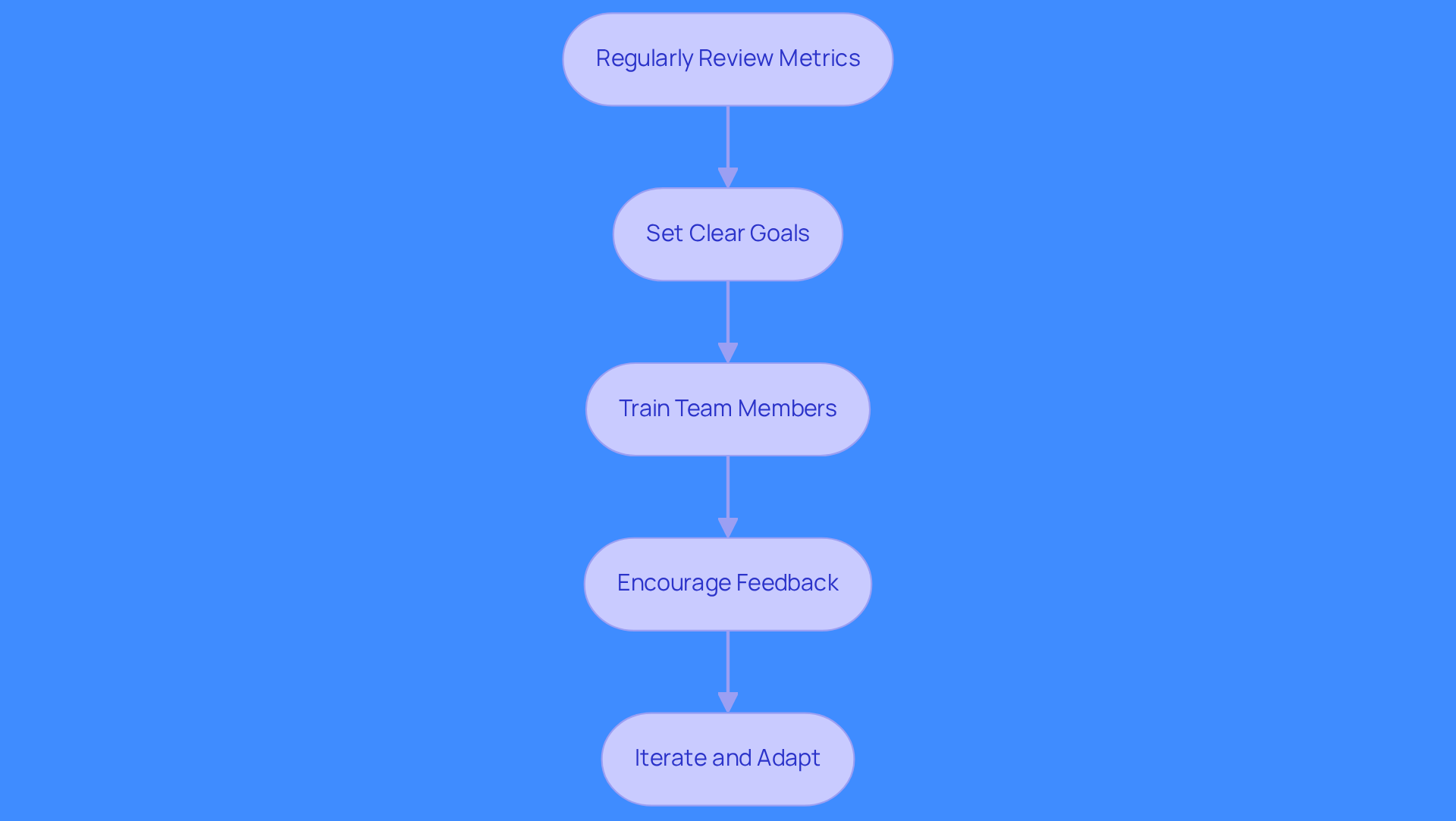
- Regularly Review Metrics: Schedule weekly or monthly reviews of dashboard metrics to identify trends and areas for improvement. This keeps teams aligned and ready to adapt quickly.
- Set Clear Goals: Establish specific, measurable goals for outbound activities. This alignment with overall sales objectives helps teams focus their efforts and assess success effectively.
- Train Team Members: Provide comprehensive training on how to use the interface effectively. Ensuring that all team members are proficient in leveraging its features can significantly enhance productivity and engagement.
- Encourage Feedback: Establish a feedback loop where team members can share insights on interface usability and propose enhancements. This collaboration leads to continuous improvement and ensures the dashboard meets the team's needs.
- Iterate and Adapt: Continuously enhance the dashboard based on results data and team feedback. Frequent updates to the outbound dashboard help maintain its relevance and efficiency, enabling teams to respond proactively to performance indicators.
Following these best practices boosts productivity and drives better results in outbound sales. Organizations that prioritize these practices see measurable gains in conversion rates and revenue.
Analyze Dashboard Data for Continuous Improvement in Sales Strategies
Sales teams often struggle with fragmented data and unclear performance metrics, hindering their ability to drive revenue effectively. Focus on these key aspects to enhance your sales strategy:
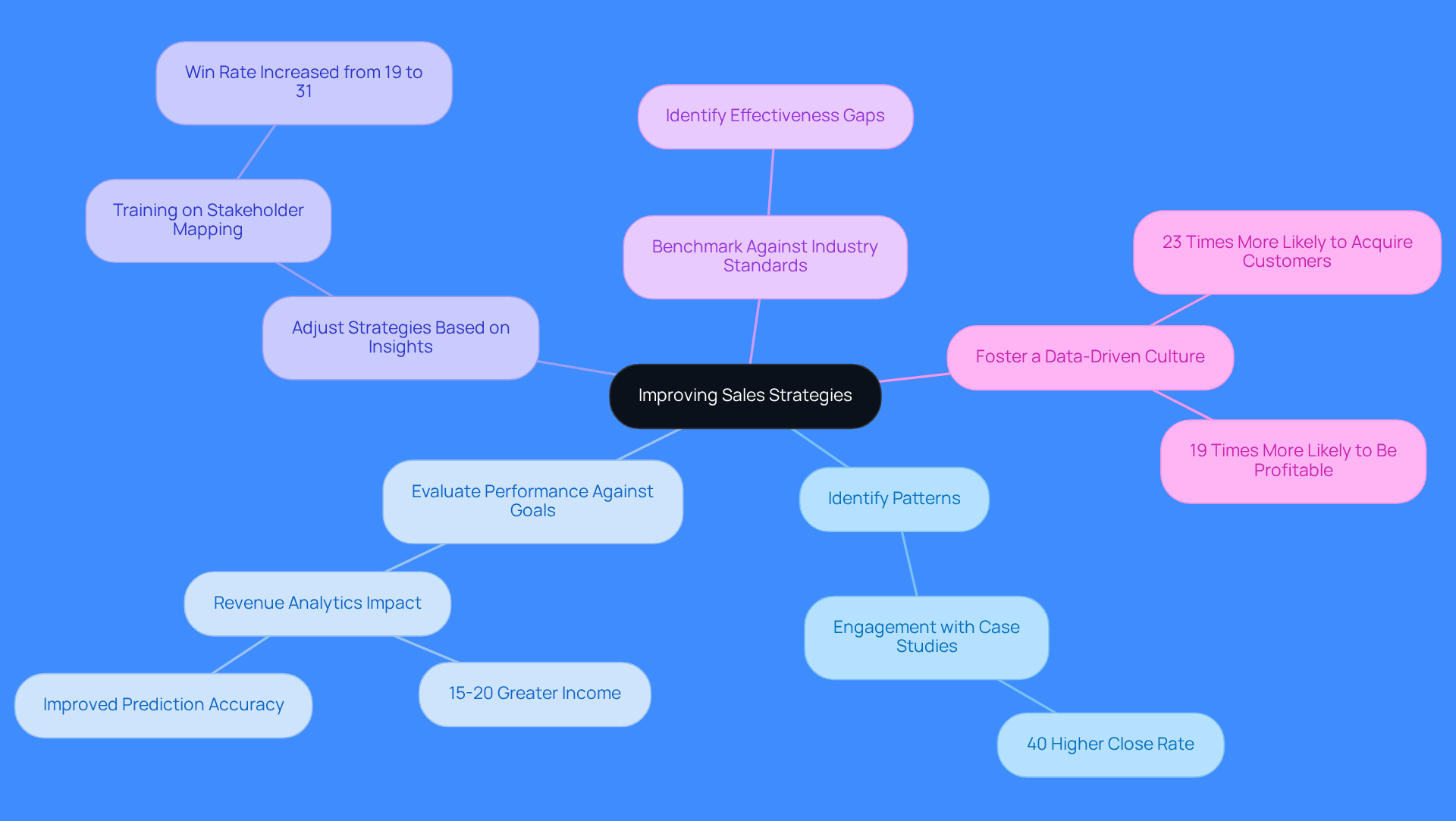
- Identify Patterns: A SaaS firm found that prospects engaging with case studies before sales conversations closed 40% more often, highlighting the need to understand lead behavior.
- Evaluate Performance Against Goals: Consistently measure performance metrics against your goals to gauge effectiveness. Organizations utilizing revenue analytics generally experience 15-20% greater income and improved prediction accuracy compared to those relying solely on intuition.
- Adjust Strategies Based on Insights: Refine your outreach strategies based on data insights, adjusting messaging and targeting as needed. A manufacturing firm increased its win rate from 19% to 31% by implementing training on stakeholder mapping after analyzing their revenue data.
- Benchmark Against Industry Standards: Benchmarking against industry standards reveals effectiveness gaps and growth opportunities, keeping your sales team competitive.
- Foster a Data-Driven Culture: Foster a data-driven culture where decisions are based on insights, driving continuous improvement. Companies that prioritize data-driven decision-making are 23 times more likely to acquire customers and 19 times more likely to be profitable.
By systematically analyzing the outbound dashboard, sales teams can enhance their strategies and drive better outcomes in their outbound efforts. By leveraging Regie.ai's capabilities, teams can automate high-quality outbound at scale, ensuring they reach 3-5x more accounts with personalized, signal-driven outreach, ultimately transforming their sales performance.
Conclusion
Sales teams face challenges with fragmented data and inefficient workflows that hinder performance and revenue growth. These tools turn raw data into actionable insights, allowing teams to prioritize high-impact activities. Outbound dashboards offer key features like real-time data visualization and customizable reports. These empower sales teams to make quick, informed decisions.
Best practices include:
- Regular metric reviews
- A data-driven culture
These practices keep teams agile and responsive to market changes. Analyzing dashboard data drives continuous improvement in sales strategies, boosting conversion rates and revenue.
Regie.ai enhances these efforts by automating personalized outreach at scale. Using outbound dashboards and tools like Regie.ai, sales teams boost efficiency and reach more prospects. Adopting these strategies enhances operational efficiency and drives sustainable revenue growth in a competitive market.
Frequently Asked Questions
What is an outbound dashboard?
An outbound dashboard is a command hub for sales teams that aggregates key revenue metrics and activity indicators essential for outbound sales success.
How do outbound dashboards enhance sales processes?
Outbound dashboards enhance sales processes by providing real-time insights into performance metrics such as call volumes, conversion rates, and lead response times, allowing sales representatives to prioritize high-impact activities.
What benefits do organizations experience from using outbound dashboards?
Organizations using outbound dashboards report significant improvements in decision-making and resource allocation, as these tools transform raw data into organized information that guides strategic actions.
How do outbound dashboards help in monitoring sales activities?
Outbound dashboards allow teams to replicate effective behaviors by monitoring sales activities in detail, enabling them to recognize strengths and weaknesses and make prompt modifications to their strategies.
What is the ultimate goal of using an outbound dashboard?
The ultimate goal of using an outbound dashboard is to empower sales teams to focus on high-impact actions that drive revenue growth.
List of Sources
- Understand the Outbound Dashboard: Definition and Importance
- The Ultimate Guide to Sales Performance Dashboards (https://about.crunchbase.com/blog/sales-performance-dashboards)
- Why the sales dashboards is not dead (https://phocassoftware.com/resources/blog/why-the-sales-dashboard-is-not-dead)
- Sales Stats - Activities (INSIGHTS) (https://avionteboldsupport.zendesk.com/hc/en-us/articles/7155348937875-Sales-Stats-Activities-INSIGHTS)
- Why Are Dashboards Important to Performance? (https://venasolutions.com/blog/why-are-dashboards-important-to-performance-vena?hs_amp=true)
- 10 must-have sales dashboards to boost performance (https://highspot.com/blog/sales-dashboards)
- Leverage Key Features of Outbound Dashboards for Enhanced Efficiency
- The Power of Real-Time Data Visualization (https://lucid.co/blog/the-power-of-real-time-data-visualization)
- 5 Best Practices for Successful Dashboard Reporting (https://performanceinstitute.org/blog-business-intelligence-plus/5-best-practices-for-successful-dashboard-reporting?hs_amp=true)
- Business Intelligence Dashboard Benefits: Key Features (https://domo.com/learn/article/the-benefits-of-business-intelligence-dashboards)
- Sales dashboards: examples, KPIs, and how to build one | Geckoboard (https://geckoboard.com/dashboard-examples/sales)
- The Elements Of An Effective Sales Dashboard - Demand Gen Report (https://demandgenreport.com/demanding-views/the-elements-of-an-effective-sales-dashboard/21783)
- Implement Best Practices for Maximizing Outbound Dashboard Effectiveness
- The Ultimate Guide to Sales Performance Dashboards (https://about.crunchbase.com/blog/sales-performance-dashboards)
- Sales Dashboards: A Field Guide to the Ones That Actually Get Used | Aviso Blog (https://aviso.com/blog/sales-dashboards)
- Building sales dashboards to improve performance | Tribe CRM (https://tribecrm.eu/blog/best-practices-for-building-sales-dashboards)
- Ultimate Guide to Building Sales Dashboards: Tools & Examples (https://forecastio.ai/blog/sales-dashboard)
- The Perfect Sales Dashboard Should Have These 12 Sales Metrics (https://salesforce.com/in/hub/analytics/essential-sales-dashboard-tips)
- Analyze Dashboard Data for Continuous Improvement in Sales Strategies
- Understanding sales analytics: Why data is leading the charge (https://domo.com/learn/article/understanding-sales-analytics-why-data-is-leading-the-charge)
- 3 Steps to Effectively Analyze Sales Data - Home Furnishings Association (https://myhfa.org/blog/3-steps-to-effectively-analyze-sales-data)
- Sales Data Analysis: Complete Guide to Sales Analytics 2025 | Valiotti Data (https://valiotti.com/what-is-sales-data-analysis)
- The Power of Data: How to Drive Sales Growth with Analytics | Sales Xceleration Blog (https://salesxceleration.com/the-power-of-data-how-to-drive-sales-growth-with-analytics)
- Using Data Analytics to Boost Sales Performance (https://linkedin.com/top-content/sales/using-data-analytics-in-sales/using-data-analytics-to-boost-sales-performance)
FAQs
Read more posts
View all Blogs

Need more help?
If you still have questions, make sure to check out our Help Center: there, you'll find all the tips & advice you'll need to get your team up & running with Regie.ai.